This page lists files in the current directory. You can view content, get download/execute commands for Wget, Curl, or PowerShell, or filter the list using wildcards (e.g., `*.sh`).
wget 'https://sme10.lists2.roe3.org/guppy/inc/ckeditor/plugins/exportpdf/CHANGELOG.md'# CKEditor 4 Export to PDF Plugin Changelog
## ckeditor4-plugin-exportpdf 1.0.1
Other Changes:
* Improved external CSS support for [Classic Editor](https://ckeditor.com/docs/ckeditor4/latest/examples/classic.html) by handling exceptions and displaying convenient [error messages](https://ckeditor.com/docs/ckeditor4/latest/guide/dev_errors.html#exportpdf-stylesheets-incaccessible).
## ckeditor4-plugin-exportpdf 1.0.0
The first stable release of the CKEditor 4 WYSIWYG Editor Export to PDF plugin. After a few months of the beta phase, testing and listening to community feedback, the CKEditor 4 Export to PDF plugin is stable and can be used with full confidence. Enjoy!
New Features:
* Introduced access control mechanism. The plugin now can be configured with additional [exportPdf_tokenUrl](https://ckeditor.com/docs/ckeditor4/latest/api/CKEDITOR_config.html#cfg-exportPdf_tokenUrl) option to allow commercial use.
## ckeditor4-plugin-exportpdf 0.1.2
Other Changes:
* Improved [plugin API documentation](https://ckeditor.com/docs/ckeditor4/latest/api/CKEDITOR_config.html#cfg-exportPdf_fileName).
* Updated Export to PDF plugin npm readme to link to the [official plugin documentation](https://ckeditor.com/docs/ckeditor4/latest/features/exporttopdf.html).
## ckeditor4-plugin-exportpdf 0.1.1
Other Changes:
* Renamed the Export to PDF plugin button from `exportPdf` to `ExportPdf`. The `ExportPdf` name should now be used while setting up a custom toolbar with the [CKEDITOR.config.toolbar](https://ckeditor.com/docs/ckeditor4/latest/api/CKEDITOR_config.html#cfg-toolbar) configuration option.
## ckeditor4-plugin-exportpdf 0.1.0
The first beta release of the CKEditor 4 Export to PDF plugin.
This plugin allows you to easily print your WYSIWYG editor content to a PDF file. When enabled, this feature sends the content of your editor together with the styles that are used to display it to the CKEditor Cloud Services HTML to PDF converter service. The service then generates a PDF document that can be downloaded by the user.
Available features:
* Exporting HTML content from CKEditor 4 WYSIWYG editor to PDF with a single click.
* Setting a custom name for the generated PDF file.
* Handling relative image paths.
* Changing the appearance of the PDF document (like margins, text styling, custom headers and footers etc.) with custom CSS styles.
* Pre-processing HTML content via synchronous and asynchronous code before the generation of the PDF file.
wget 'https://sme10.lists2.roe3.org/guppy/inc/ckeditor/plugins/exportpdf/LICENSE.md'Software License Agreement
==========================
**CKEditor 4 Export to PDF plugin** (https://ckeditor.com/ckeditor-4/)<br>
Copyright (c) 2003-2020, [CKSource](http://cksource.com) Frederico Knabben. All rights reserved.
CKEditor 4 Export to PDF plugin is licensed under a commercial license and is protected by copyright law.
For more details about available licensing options please contact us at sales@cksource.com.
Sources of Intellectual Property Included in CKEditor 4 export to PDF
---------------------------------------------------------------------
Where not otherwise indicated, all CKEditor 4 Export to PDF plugin content is authored by CKSource engineers and consists of CKSource-owned intellectual property.
Trademarks
----------
**CKEditor** is a trademark of [CKSource](http://cksource.com) Frederico Knabben. All other brand and product names are trademarks, registered trademarks or service marks of their respective holders.
wget 'https://sme10.lists2.roe3.org/guppy/inc/ckeditor/plugins/exportpdf/README.md'# CKEditor 4 Export to PDF Plugin
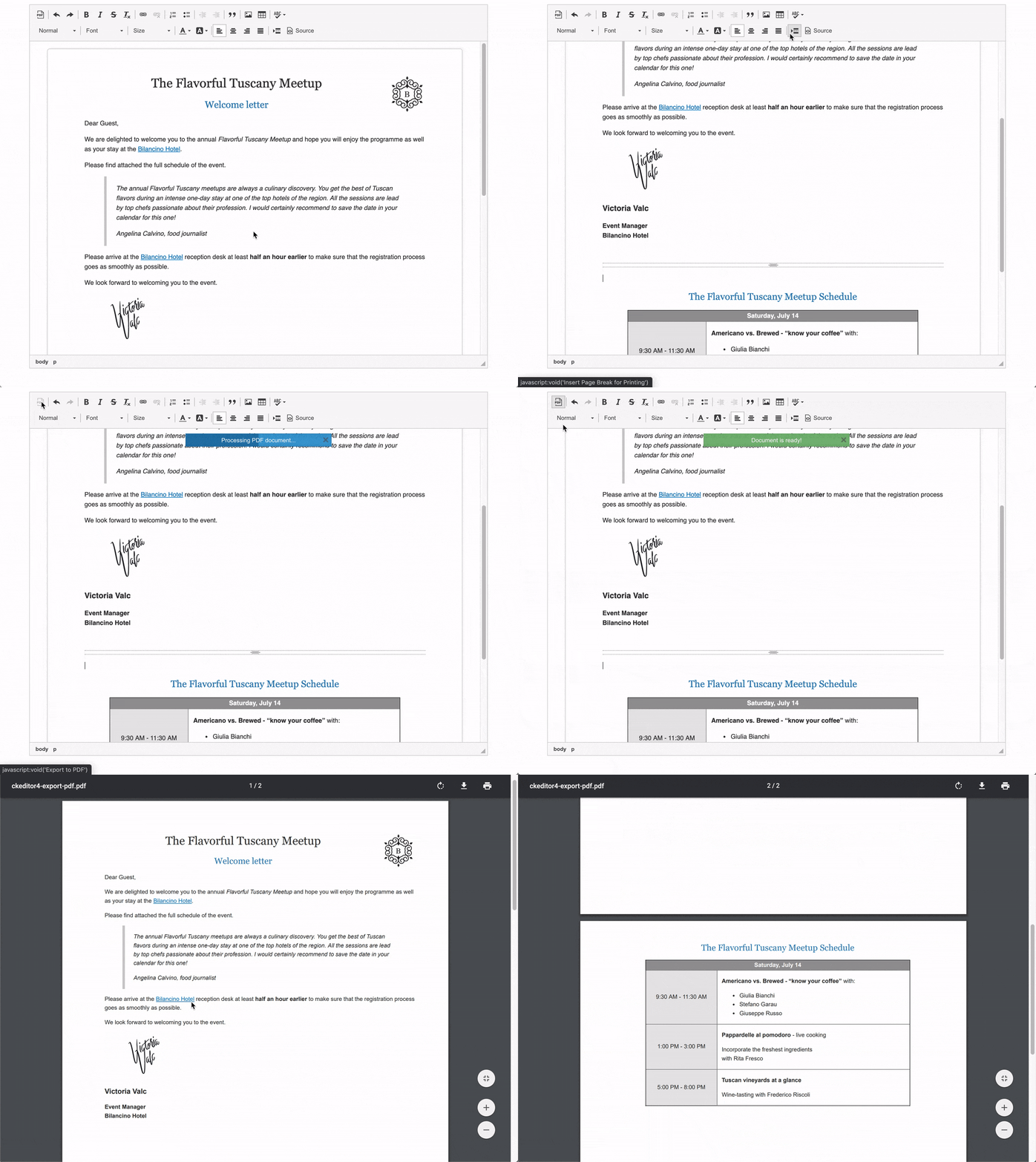
The **Export to PDF** CKEditor 4 plugin allows you to easily print the WYSIWYG editor content to a PDF file. When enabled, this feature sends the content of your editor together with the styles that are used to display it to the CKEditor Cloud Services HTML to PDF converter service. The service then generates a PDF document that can be downloaded by the user.
Thanks to this plugin, it takes exactly one button click to get a PDF file with content formatted in the same way as the one visible in CKEditor 4.
CKEditor 4 **Export to PDF** also allows various customizations like changing the page size and margin, setting additional styling, adding custom headers and footers and pre-processing content. This gives great flexibility and control over the PDF output and allows to keep all the PDF documents consistent when it comes to styling.
This is a premium feature. Please [contact us](https://ckeditor.com/contact/) if you would like to purchase a license. Let us know if you have any feedback or questions! You can also sign up for the [CKEditor Premium Features 30-day Free Trial](https://orders.ckeditor.com/trial/premium-features).
If this feature is used without authorization, the resulting documents will be watermarked.
## Getting Started
### Using with official CKEditor 4 presets
Starting with CKEditor 4 version `4.15.0`, **Export to PDF** plugin is included in `standard-all`, `full` and `full-all` official presets. The `full` and `full-all` presets have the plugin active by default while for `standard-all` it needs to be enabled with the [`config.extraPlugins`](https://ckeditor.com/docs/ckeditor4/latest/api/CKEDITOR_config.html#cfg-extraPlugins) configuration option:
```js
CKEDITOR.replace( 'editor', {
extraPlugins: 'exportpdf'
} );
```
### Installation from npm
To instal the plugin via npm, simply run:
```bash
npm i ckeditor4-plugin-exportpdf
```
Then add the plugin to your CKEditor 4 instance with the [`addExternal()` method](https://ckeditor.com/docs/ckeditor4/latest/api/CKEDITOR_plugins.html#method-addExternal):
```js
CKEDITOR.plugins.addExternal( 'exportpdf', './node_modules/ckeditor4-plugin-exportpdf/' );
```
If you prefer not to link to the `node_modules` folder directly, you may simply copy the entire `./node_modules/ckeditor4-plugin-exportpdf/` directory as `ckeditor/plugins/exportpdf/` and add it with the [`config.extraPlugins`](https://ckeditor.com/docs/ckeditor4/latest/api/CKEDITOR_config.html#cfg-extraPlugins) configuration option:
```js
CKEDITOR.replace( 'editor', {
extraPlugins: 'exportpdf'
} );
```
### Other Installation Methods
You can also use the [CKEditor 4 Add-ons repository](https://ckeditor.com/cke4/addons/plugins/all) to obtain the plugin via:
* [Custom build with online builder](https://ckeditor.com/cke4/builder)
* [Manual download](https://ckeditor.com/cke4/addon/exportpdf)
Refer to [Export to PDF installation documentation](https://ckeditor.com/docs/ckeditor4/latest/features/exporttopdf.html#installation) for more details. If you are having trouble setting up the Export to PDF plugin, please [contact us](https://ckeditor.com/contact/).
### Setting up a license key
If you have a commercial license for **Export to PDF** plugin, [exportPdf_tokenUrl](https://ckeditor.com/docs/ckeditor4/latest/api/CKEDITOR_config.html#cfg-exportPdf_tokenUrl) configuration option should be set to remove watermark from generated documents:
```js
CKEDITOR.replace( 'editor', {
exportPdf_tokenUrl: 'https://example.com/cs-token-endpoint'
} );
```
This value is unique for each customer and can be found in the [CKEditor Ecosystem dashboard](https://dashboard.ckeditor.com).
This is all. If you are having trouble in setting up Export to PDF plugin, please [contact us](https://ckeditor.com/contact/).
## Features
The CKEditor 4 Export to PDF plugin is really simple to use and works out-of-the-box. It does not require any additional configuration and due to its flexible nature, it covers a lot of cases internally while also providing an easy way to [customize output PDF files](https://ckeditor.com/docs/ckeditor4/latest/features/exporttopdf.html#configuration).
The most important features are:
* Exporting HTML content from CKEditor 4 WYSIWYG editor to PDF with a single click.
* [Setting a custom name](https://ckeditor.com/docs/ckeditor4/latest/features/exporttopdf.html#setting-dynamic-file-name) for the generated PDF file.
* [Handling relative image paths](https://ckeditor.com/docs/ckeditor4/latest/features/exporttopdf.html#relative-vs-absolute-urls).
* [Changing the appearance of the PDF document](https://ckeditor.com/docs/ckeditor4/latest/features/exporttopdf.html#custom-css-rules) (like margins, text styling, custom headers and footers etc.) with custom CSS styles.
* [Pre-processing HTML content](https://ckeditor.com/docs/ckeditor4/latest/features/exporttopdf.html#data-preprocessing) via synchronous and asynchronous code before the generation of the PDF file.
## Browser and CKEditor 4 Support
The CKEditor 4 Export to PDF plugin works in all the browsers [supported by CKEditor 4](https://ckeditor.com/docs/ckeditor4/latest/guide/dev_browsers.html) except for Internet Explorer versions older than version 11. The plugin is compatible with CKEditor 4 versions starting from `4.6.1`.
## Demo
See the working ["Exporting editor content to PDF"](https://ckeditor.com/docs/ckeditor4/latest/examples/exporttopdf.html) sample that showcases printing your HTML content to a PDF file.
## License
**CKEditor 4 Export to PDF plugin** (https://ckeditor.com/ckeditor-4/)<br>
Copyright (c) 2003-2020, [CKSource](http://cksource.com) Frederico Knabben. All rights reserved.
CKEditor 4 export to PDF plugin is licensed under a commercial license and is protected by copyright law.
For more details about available licensing options please contact us at sales@cksource.com.
### Trademarks
**CKEditor** is a trademark of [CKSource](http://cksource.com) Frederico Knabben. All other brand and product names are trademarks, registered trademarks or service marks of their respective holders.
wget 'https://sme10.lists2.roe3.org/guppy/inc/ckeditor/plugins/exportpdf/package.json'{
"name": "ckeditor4-plugin-exportpdf",
"version": "1.0.0",
"description": "Plugin adds export to PDF functionality to CKEditor 4.",
"main": "plugin.js",
"author": "CKSource (http://cksource.com/)",
"license": "SEE LICENSE IN LICENSE.md",
"peerDependencies": {
"ckeditor4": ">=4.6.1"
},
"homepage": "https://ckeditor.com/export-to-pdf-word/",
"bugs": "https://github.com/ckeditor/ckeditor4/issues/",
"keywords": [
"ckeditor",
"ckeditor4",
"ckeditor 4",
"ckeditor4-plugin",
"WYSIWYG",
"WYSIWYM",
"text",
"rich-text",
"richtext",
"editor",
"editing",
"html",
"contentEditable",
"PDF",
"print PDF",
"save PDF",
"convert to PDF",
"export PDF",
"export to PDF",
"PDF converter",
"HTML to PDF",
"HTML2PDF"
]
}wget 'https://sme10.lists2.roe3.org/guppy/inc/ckeditor/plugins/exportpdf/plugindefinition.js'